

Sheet JSON is an open source format we built at Quicko to represent spreadsheet data as plain, typed JSON. It keeps the familiar shape of a workbook (sheets, tables, key-value lists) and drops everything that makes Excel hard for programs to work with.
Personal finance runs on spreadsheets
At Quicko, almost every piece of personal finance data we touch starts life as a spreadsheet. A broker’s tax P&L, a capital gains statement, a mutual fund CAS, a salary breakup, a bank statement export, a tax computation report: all of them arrive as .xlsx or .csv.
Users and accountants trust spreadsheets because they can see, sort and sum the data themselves. That trust is well earned. But a spreadsheet is a document built for people, and we needed to move that same data through APIs, queues, databases and tax computation engines.
Excel is great for people, poor for programs
An .xlsx file is a zipped bundle of XML parts: shared strings, styles, themes, cell references and formulas. To read one value, a program has to unzip the archive, resolve the shared string table and walk cell coordinates.
That works for one file on a laptop. It does not work well when thousands of files move between services every hour during tax season. These are the problems we kept running into:
Heavy to transport. A binary file can’t be sent inline in a JSON API request/response or logged in a readable form. It has to be uploaded, stored and downloaded separately.
No structure a program can rely on. A sheet is a grid of cells. Where one table ends and the next begins, or which row is the header, is a human convention, not something the file declares.
No types. A cell holding
1,50,000may be a number, a formatted string or a formula result. Dates may be serial numbers or text. For tax computation, guessing is not acceptable.Hard to validate. There is no schema to check an uploaded file against before it reaches business logic.
Hard to diff and test. You can’t review a binary file in a pull request or assert on it cleanly in a unit test.
CSV solves transport but loses everything else: one table per file, no sheets, no metadata, no types. Plain JSON is easy to program against, but every team invents its own shape, and the result no longer looks like the spreadsheet the user started with.
What we needed
We wanted one data structure that a CA would recognise as a spreadsheet and an engineer would recognise as a typed object. Our requirements were:
Spreadsheet-shaped. Workbooks, named sheets, and more than one block of data per sheet, just like a real report.
Plain JSON. Readable, loggable, storable in a document database and sent inline in any REST API.
Lightweight. No styles, themes or cell coordinates. Only the data and the names needed to find it.
Typesafe. Generate Java and TypeScript classes from a schema, so
getTotalIncome()replacesrow[7].Lossless round-trip. Convert from .xlsx to JSON and back without losing structure, so users can still download a spreadsheet.
Language neutral. The same payload must work in our Java services and our Angular and Node.js code.
Introducing Sheet JSON
Sheet JSON models data in three layers: a workbook holds sheets, and each sheet holds blocks. A block is either a Table or a List.
Every node carries three common fields:
@entityidentifies the type:workbook,sheet,tableorlist. It is the discriminator that tells a deserializer which class to build for each node.nameis how code finds a sheet or block, for examplepayment_table.metadataholds optional key-value annotations about that node.
Table
A table is for columnar records: trades, settlements, bank transactions. header is an array of column names and rows is an array of arrays.
A value belongs to the column at the same index in the header, and null marks an empty cell. Column names are written once, not repeated on every row as an array of objects would.
List
A list is for named values: totals, report parameters, a taxpayer’s profile. Each item is a single-property object, so the key reads like a label in column A and the value like the cell next to it.
Workbook
A capital gains statement becomes one workbook. Equity trades and their summary sit on one sheet, the way a broker’s report would lay them out:
That is the whole format. There are no cell addresses, styles or formulas, only data and the names needed to reach it.
Why Sheet JSON works
Sheet JSON keeps what people like about spreadsheets and adds what programs need.
XLSX | CSV | Sheet JSON | |
|---|---|---|---|
Multiple sheets and blocks | Yes | No | Yes |
Readable inline in APIs | No | Yes | Yes |
Declared structure | No | Partly | Yes |
Data types | Partly | No | Yes |
Typed classes from a schema | No | No | Yes |
Diffable in code review | No | Yes | Yes |
Converts to .xlsx | Native | Yes | Yes |
Lightweight on the wire. Column names appear once per table instead of once per row, and there is no styling or zip container to carry.
Typesafe. A JSON Schema describes the workbook’s sheets, blocks, columns and data types. Generators turn it into Java classes (a Maven plugin) or TypeScript classes (a CLI). Code calls named getters instead of indexing into arrays.
Precise with money. The Java mapper reads decimals as
BigDecimaland integers asBigInteger, so a capital gain of 11050.00 is never rounded through adouble.Polymorphic by design. The
@entitydiscriminator maps each node to its class. In TypeScript, reflect-metadata and class-transformer decorators turn Sheet JSON into typed objects. In Java, Jackson annotations and an ObjectMapper turn it into POJOs. Neither side needs custom parsing.Round-trips to Excel. Users still get a spreadsheet to download. In the XLSX converter, blocks on a sheet are separated by a blank row, the first row of each block is its name, and a name ending in
listmarks a List.Testable. Fixtures are JSON files. You can assert on them, diff them in a pull request and read them in logs.
Using Sheet JSON
The sheet-json repository holds a core library and a class generator for each language:
Package | What it does |
|---|---|
| Java library. Reads and updates workbooks, maps JSON to Java objects with Jackson and exports to .xlsx with Apache POI. |
| Java Maven plugin. Generates Java classes from a workbook JSON Schema. |
| TypeScript library. Reads and updates workbooks and converts JSON and .xlsx to typed class instances and back. |
| TypeScript CLI. Generates TypeScript classes from a JSON Schema. |
The workflow is the same in both languages:
Describe the workbook in a JSON Schema: its sheets, blocks, columns and types. You can write it by hand, build it in Sheet Tools, or generate a first draft from a sample .xlsx or JSON file.
Generate classes from the schema.
Deserialise incoming JSON into typed interfaces, work with typed data, and serialise back to JSON or .xlsx.
Java
Add the generator’s schema-to-pojo goal to your build. It needs a schema path and a target package:
Then read a workbook with the library’s preconfigured JsonMapper. It reads decimals as BigDecimal, which is what tax arithmetic needs.
TypeScript
Add the generator as a script, then use the generated classes with class-transformer:
Columns or list keys whose name contains epoch are converted between epoch milliseconds in JSON and readable dates in Excel, in both directions.
Sheet Tools
Sheet Tools is a browser app for people who would rather not write JSON Schema or read raw JSON by hand. It is hosted at sheet-tools.quicko.org.in, and its source lives in the same repository.
It has two tools: a schema builder to design a workbook, and a visualiser to see and edit the data in it. Workbooks you build are saved locally in your browser’s storage.
Schema builder
The schema builder lets you design a workbook’s structure visually and export it as JSON Schema, ready for the generators.

Build the hierarchy. Create a workbook, add sheets to it, and add Table or List blocks to each sheet. Rename or delete any of them as the design changes.
Define fields. For each column or list key, set a name, description and type: string, number, integer, boolean or array.
Add validations. Set minimum and maximum length for strings, minimum and maximum values for numbers, and a list of allowed values for enums.
Pick a number format. Mark numbers as
BigDecimalorLong, so the generated Java classes use the right type for amounts and identifiers.Import and export. Start from an existing schema by pasting it in, then download the result as a
.jsonschema file.
The exported schema is what you pass to schema-to-pojo in Java or schema-to-objects in TypeScript.
Sheet visualiser
The sheet visualiser opens workbook JSON in a spreadsheet-like view, so anyone on the team can inspect the data without reading nested arrays.
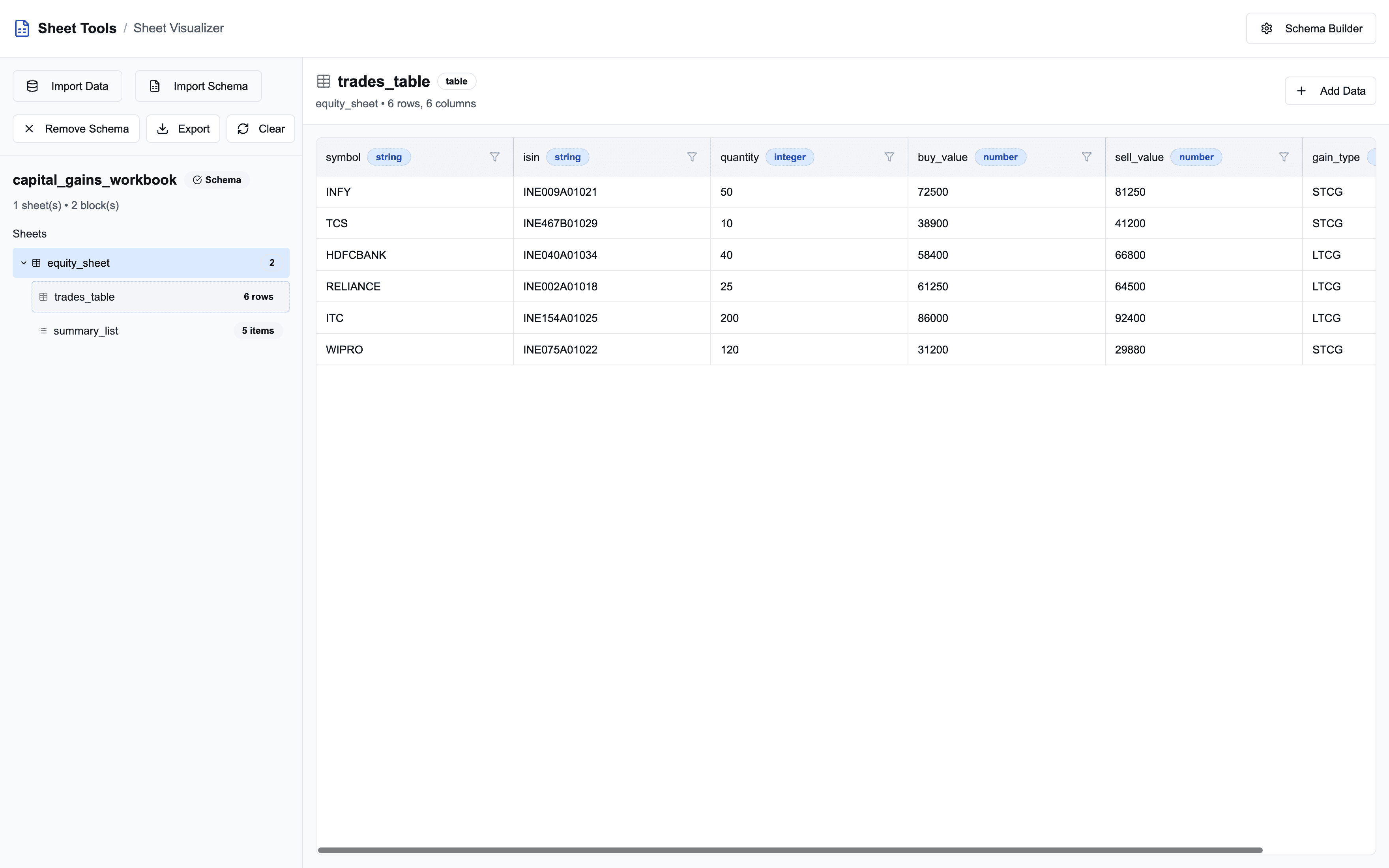
Load data three ways. Paste workbook JSON, drop in a
.jsonfile, or fetch it from a URL.Navigate like Excel. Each sheet appears as a tab. Tables render as rows and columns, and lists render as key-value pairs. Large tables stay fast because rows are virtualised.
Validate against a schema. Load the workbook’s JSON Schema alongside the data, and the visualiser checks the data against it and flags what doesn’t match.
Edit in place. Add or edit rows in a table and items in a list, then export the updated workbook as JSON.
Together they cover the full loop: design the workbook in the builder, generate classes from its schema, and use the visualiser to check the JSON your services produce.
Where it fits at Quicko
Sheet JSON is the shape our tabular data takes as it moves between services. A tradebook a user uploads on Quicko becomes a workbook that our tax engine reads with typed classes.
A Sandbox API can return a report as Sheet JSON that a developer can process in code or convert to .xlsx for their own users. A CA on Quicko Pro can download the same data as a familiar spreadsheet.
One format means one set of parsers, one set of tests and one mental model across Java services, Node.js and Angular/React. When a report changes, we change the schema, regenerate the classes and let the compiler point out what broke.
Open source
We built Sheet JSON to solve our own problem, and we think many teams that move spreadsheet data through code have the same one. The Java and TypeScript libraries, both generators and Sheet Tools are open source on GitHub.
Try it on your next report, and open an issue or a pull request if something is missing.


